
The Commonwealth of Pennsylvania is proud to offer commuter benefits to all eligible employees.
Use your Jawnt Pass debit card to pay for transit or parking using pre-tax dollars, and save up to 30% or more on your commute.
1. Go to jawntpass.com/signin/copa
2. From the Commonwealth of PA portal, log in to Jawnt with your Commonwealth credentials
3. Follow the steps to set up your monthly contribution amounts
For a visual walkthrough of this process, watch our Commuter Benefits 101 video.
Here are answers to some common questions Commonwealth of Pennsylvania employees have about Jawnt Pass. Additional resources can be found in our Help Center.

How can I save money with commuter benefits?
Commuter benefits allow you to spend pre-tax dollars on eligible transportation expenses, like parking and public transportation. Since contributions are made with pre-tax dollars, your taxable income is reduced—potentially saving you hundreds of dollars annually, depending on your income and contribution level.
Can I use commuter benefits if I telework?
If you telework full-time and do not commute, you likely won’t use commuter benefits. However, if you occasionally go into the office, you can still use benefits on those days and contribute only what you need.
Can I use commuter benefits for travel to locations other than work?
No. These benefits are intended only for work-related commuting expenses. Travel for personal or non-work reasons is not eligible.
What happens if I leave my job or change employers?
If you separate employment, you'll have 60 days after your last day of employment to request reimbursement for eligible expenses that you incurred while you were employed. Any remaining balance that is not used or claimed by the deadline will be returned to the Commonwealth. If you're switching to another participating agency within the Commonwealth, your account will remain active, and you can continue to use your benefits without interruption.
Can I use commuter benefits for both public transportation and parking?
Yes! You can elect to contribute to both transit and parking accounts and use the same Jawnt Pass card for both.In 2026, you can contribute up to $340 of pre-tax funds and additional $175 post-tax for a total of $515 per month for parking. Similarly, you can contribute up to $340 of pre-tax funds and additional $175 post-tax for a total of $515 per month for transit.
Can I use commuter benefits for transportation to a work-related event, such as a conference or seminar?
Yes, as long as the event is work-related and the transportation expense qualifies (e.g., transit fare or parking near the event).
Can I use commuter benefits to pay for an electric vehicle charging station?
No, EV charging does not qualify as an eligible expense.
Who can use my Jawnt Pass?
Only you! Because the card is funded with pre-tax income from your paycheck, it is intended only for the cardholder’s use.
Can I have multiple Jawnt Passes?
No, as a Commonwealth of Pennsylvania employee, you are eligible for one Jawnt Pass. The same pass can be used for eligible transit and parking costs.
Why does my Jawnt Pass have a maximum balance?
To prevent unspent funds from accumulating, there’s a $1,000 account cap on your Jawnt Pass. There is no way to get money back from your card once you’ve contributed. If you separate employment, you’ll have 180 days to request reimbursement for eligible expenses incurred while you were employed. Any unspent funds will be returned to the Commonwealth.If you need to, you can always pause or adjust your monthly contributions.
What happens if I overestimate my commuting costs and contribute more than needed?
Any unused funds will remain on your Jawnt Pass and roll over to the next month, up to the $1,000 maximum account balance. You can adjust your monthly contributions at any time to better match your actual needs.
Do I have to use my commuter benefits every month?
No. While you can contribute monthly, there’s no requirement to use your funds each month. Unused funds will stay in your account (within the $1,000 cap) until you’re ready to use them.
Do I need to provide proof of commuting expenses?
Not for regular card use—Jawnt authorizes transactions to confirm eligibility but does not require receipts. However, if you are submitting a reimbursement request, you’ll need a receipt that clearly shows the vendor, date, and amount.
Can I use my Jawnt Pass on a parking meter app?
Yes, as long as the app is used for work-related parking.
Can I be reimbursed for commuting expenses paid out of pocket?
You can be reimbursed for eligible parking expenses. If you purchased parking and weren’t able to use your Jawnt Pass, learn how to request a reimbursement in the section "How do I get reimbursed for a qualified purchase?" below.
Commonwealth employees can contribute up to $515/month for transit and $515/month for parking.
For 2026, the IRS allows $340/month pre-tax for each. If you contribute more than $340, the additional amount (up to $515) will be taxed like normal income.
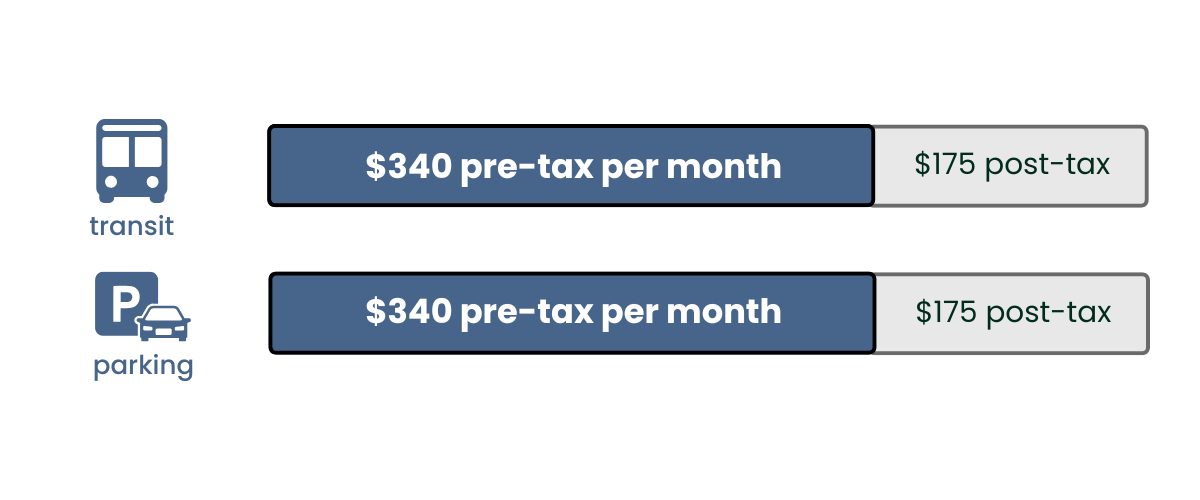
Some people only use parking funds, others only transit, but many Jawnt users set aside funds for both options. You choose how much and for what!
The Jawnt Pass offers the opportunity to set aside a portion of your pre-tax income to use on qualified transit and parking expenses. By enrolling in the Jawnt Pass, cardholders are telling their employers how much money they want deducted from their paycheck each month to be put towards transportation.

To get started:
Once you confirm, your application will be processed. Expect to receive your physical Jawnt Pass within seven business days. Your funds will be automatically deducted fromyour final paycheck of the month. Those deductions will be added to your Jawnt Passcard that same payday to use on upcoming work-related commuting expenses.
After completing the enrollment application, the Jawnt Pass will appear among your Enrolled benefits. You can edit your contribution amounts and addresses at any time by clicking the “Edit” button on your Benefits Overview page. Adjusted contributions afterthe monthly deadline will be applied to the following months deductions.
Do I need to make a new election every month, or will my deductions stay the same automatically?
Once you set your contribution amounts, your deductions will be applied every month automatically, so no further action is required unless you want to make a change or pause your contributions.
To begin using your Jawnt Pass for transit and parking purchases, you must first activate it in your Jawnt account.
When can I activate my Jawnt Pass?
You’ll need to wait until your physical card arrives in the mail before you can activate it. Please note that even after activation, your card will not be usable until deductions are taken from your final paycheck of the month. Those deductions will be added to your Jawnt Pass that same payday to use on upcoming work-related commuting expenses.
Steps to activate your Jawnt Pass

Upon confirmation, you’ll be prompted to create your four-digit PIN code. Once you have set your PIN code, click Proceed.
That's it! Your Jawnt Pass has been activated. You will receive an email from Jawnt at the end of each month confirming that your funds have been loaded. If you have any questions or need further assistance, please don't hesitate to reach out to Jawnt Support.
When you set your contribution amount(s) by the first Tuesday of the month, your commuter benefit funds will be deducted from your final paycheck of the month and loaded on to your Jawnt Pass that same payday to use on upcoming work-related commuting expenses.
If you enroll or make changes after the first Tuesday of the month, you’ll still be enrolled, but your funds won’t be deducted until the final paycheck of the following month or loaded on to your Jawnt Pass until that pay date.
Keep in mind that your paycheck amounts may vary slightly depending on your contributions.

Use the guide below to add your physical Jawnt Pass to your mobile wallet, and enjoy convenient and secure access to your transit and parking needs from your smartphone.
Getting started
Before you can add your Jawnt Pass to your mobile wallet, you'll need to activate your card online. Learn how to activate your card in the section "How do I activate my Jawnt Pass?" above.
Apple Wallet (iPhone)
Extra: Setting up an Express Transit Card on iPhone
With Express Mode, you can use Jawnt Pass in the Wallet app without waking up your phone. Just tap and go. Read more about this feature from Apple here.
Google Wallet (Android)
Samsung Wallet (Samsung)
The Jawnt Pass is a great way to save money on commuting by using pre-tax income. But what if you don’t have it with you when you pay for an eligible parking expense? No problem—within 180 days or purchase, you can submit a receipt for reimbursement out of your pre-tax parking balance.
Parking expenses eligible for reimbursement include:
At this time, transit expenses are not eligible for reimbursement.
Note: You must enroll in the Jawnt Pass benefit before you can submit a reimbursement request.
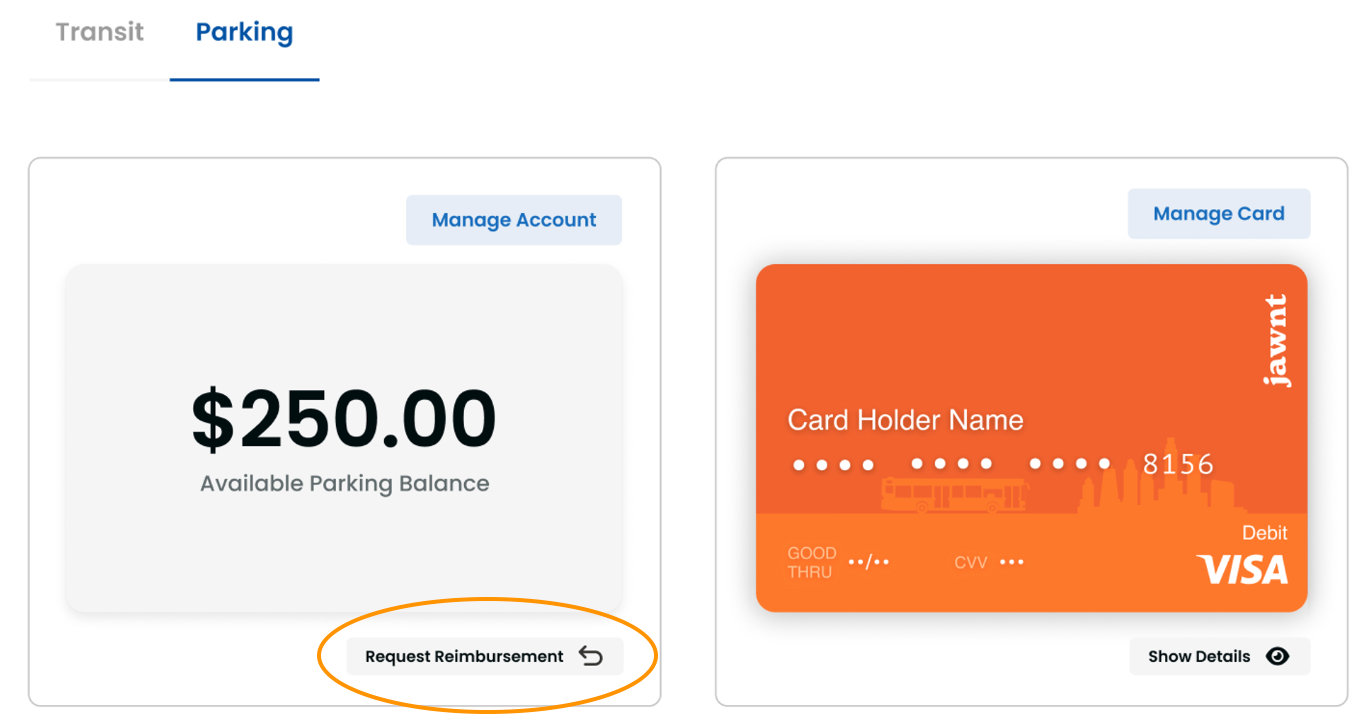
To get started, you will need a receipt (either a photo or a screenshot) that clearly displays the name of the merchant, the date, and the amount paid.
Jawnt’s team will review your request within five business days. If approved, you will receive your reimbursement within an additional five days.
The Commuter Benefits Policy Document can be found here.
What happens if I forget my password?
Click “Forgot Password” on the Jawnt login page and follow the steps to reset it. Still stuck? Reach out to support@jawntpass.com—we’ve got you.
How do I reset the PIN on my Jawnt Pass?
Your PIN works like a PIN on any other debit card (except that your Jawnt card can’t be used at ATMs), so from time to time you may need to reset it.
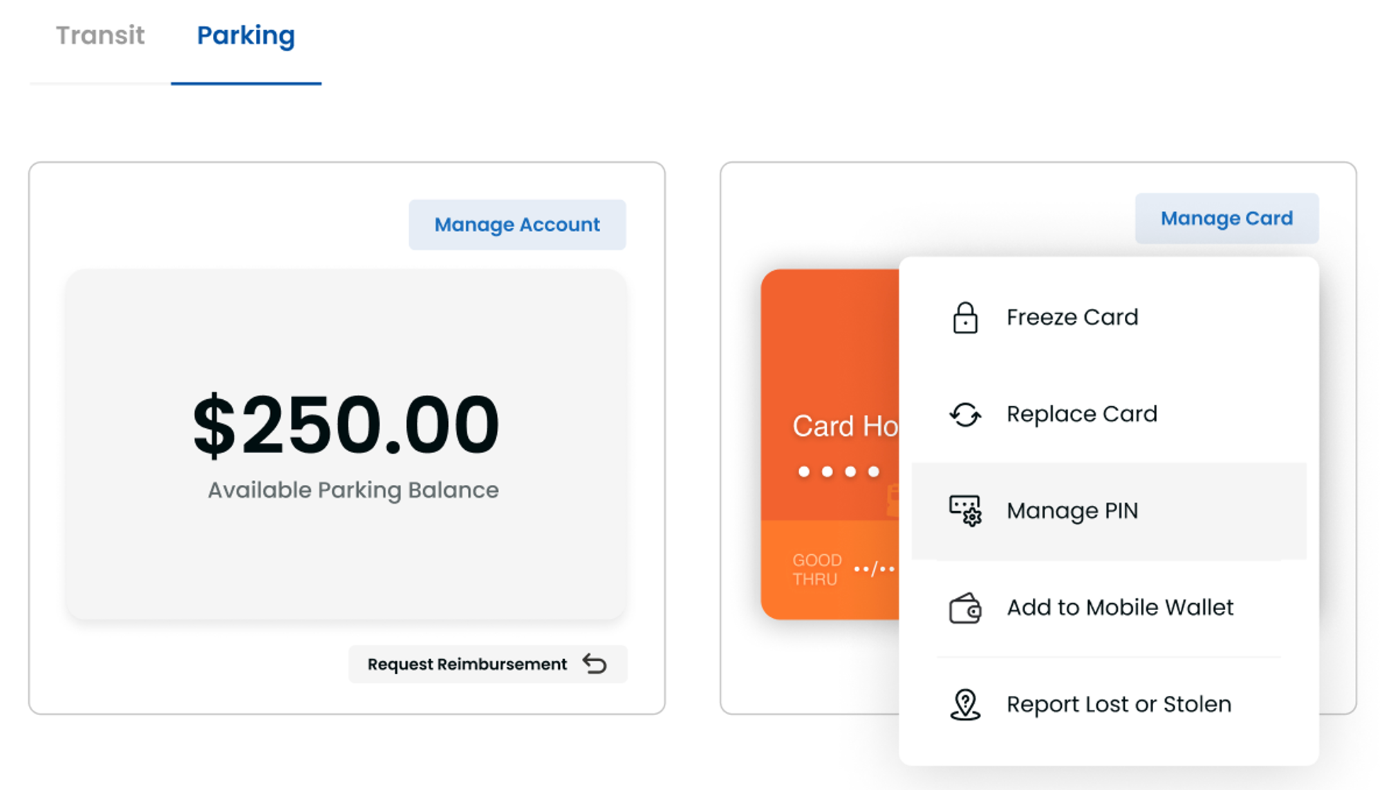
To reset your PIN:
Your PIN will be updated immediately.
How do I dispute a charge on my Jawnt Pass?
If you see a suspicious charge in the recent activity on your Jawnt Pass, call Visa© immediately at 1-833-333-0417.There’s no action available through the Jawnt platform, but it will be helpful to have the transaction details handy when you speak with Visa©, (including merchant name and date). Their support line is staffed and available 24/7.Once you’ve reported the charge, consider freezing the card for future transactions or canceling it entirely and ordering a replacement.
Freezing your Jawnt Pass
1. In the card management area, look above the picture of the physical card for the “Manage Card” button.
2. Select “Freeze card”.
3. The platform will confirm that the request to freeze the card.
4. Once frozen, no new transactions will be authorized on the card.
5. The card can be unfrozen at any time through the same menu.
Replacing your Jawnt Pass
1. In the card management area, look above the picture of the physical card for the “Manage Card” button.
2. Select “Replace Card”.
3. Confirm the address where the card should be sent, and make changes if necessary.
4. Confirm your selection by clicking “Proceed”.
5. The card will be mailed to you and arrive within 5-7 business days.
What happens if I lose my Jawnt Pass?
If you're unable to find your Jawnt Pass, Jawnt offers three options to keep you safe. These can all be accepted from the Jawnt platform.
Option 1: Freezing your Jawnt Pass
If you’ve only misplaced your card and believe it may show up again, you can temporarily freeze the card and unfreeze it at any time.
1. In the card management area, look above the picture of the physical card for the “Manage Card” button.
2. Select “Freeze card."
3. The platform will confirm the request to freeze the card.
4. Once frozen, no new transactions will be authorized on the card.5. The card can be unfrozen at any time through the same menu.
Option 2: Reporting your Jawnt Pass as Lost or Stolen
If you’re certain that your card is lost, or want to err on the side of caution, log into the Jawnt platform and cancel your card.
1. In the card management area, look above the picture of the physical card for the “Manage Card” button.
2. Select “Report Lost or Stolen”.
3. Select whether the card was lost or stolen.
4. Confirm your selection.
5. The card will be cancelled immediately, blocking any new transactions from being made. In order to continue accessing your funds , you must request a replacement card.
Option 3: Requesting a replacement Jawnt Pass
1. In the card management area, look above the picture of the physical card for the “Manage Card” button.
2. Select “Replace Card”.
3. Confirm the address where the card should be sent, and make changes if necessary.
4. Confirm your selection by clicking “Proceed”.
5. The card will be mailed to you and arrive within 5-7 business days.
How do I cancel my Jawnt Pass account?
The short answer is that your account will only be fully closed 180 days after you are no longer a part of your organization. This ensures that you can still request reimbursement for eligible expenses that were made prior to this date. That said, there are steps you can take now if you want to temporarily and safely deactivate your card.If you're unable to find your Jawnt Pass, Jawnt offers three options to keep you safe. These can all be accepted from the Jawnt platform.
How do I deactivate my card?
If you want to stop using your card and protect it from fraud, set your contributions to zero dollars and freeze the card.
Setting contributions to zero
1. Once logged into the Jawnt platform, navigate to the “My Benefits” page.
2. Under “Enrolled Benefits”, find the Jawnt Pass, and click “Edit”. This will open a summary page of your enrollment selections.
3. Set both “Transit Monthly Contribution” and “Parking Monthly Contribution” to $0.
4. Click “Update enrollment”. You will receive an email confirmation of your changes.
Freezing your card
1. Once logged into the Jawnt platform, navigate to the “Jawnt Pass” page.
2. Under the “Manage Card” menu, select “Freeze Card”.
3. Confirm that you want to freeze your card. Your card will now block new transactions.
What can I do with any remaining balance?
If you’re still an active member, you can continue to use your funds for any allowable expense. See a list of allowable expenses.
Once you become inactive, you have 180 days to request reimbursement for allowable expenses incurred while you were active.
If you still have access to the Jawnt platform, you can submit a reimbursement request by following steps in the section "How do I get reimbursed for a qualified purchase?" above.
If you cannot log into the Jawnt platform, email support@jawntpass.com to submit your request. You will need a photo of your receipt showing that the request is for an allowable expense and that the expense occurred on a date that you were an active member. If approved, Jawnt will send you a reimbursement out of your account funds via check. If you want to stop using your card and protect it from fraud, set your contributions to zero dollars and freeze the card.
For general questions on how Jawnt Pass works, how to get set up, and how to manage your contributions, visit the Jawnt Help Center or get in touch at support@jawntpass.com / 888-513-5935.
Happy riding!
Note: Some of the articles in the Help Center may not be applicable to Commonwealth of Pennsylvania employees. When in doubt, check this page or get in touch!




.png)

